Math tutoring workflow
An online whiteboard for math tutors where every step stays visible
iDroo gives math tutors one shared space for algebra steps, graphing, geometry sketches, homework review, and practice to keep between sessions.
A one-to-one lesson
Math tutoring works best when the process stays visible
In a math lesson, the answer is rarely the most useful part. The important work is the step the student chose, the mistake that explains their thinking, and the correction that helps them try the next problem with more confidence.
iDroo is useful here because the board can hold the whole tutoring conversation: prepared examples, student attempts, graph checks, diagrams, and follow-up practice. The tutor does not have to switch between a call whiteboard, a worksheet app, and separate notes just to keep the lesson moving.
Prepare the board before the call
Set up a few examples, add a worksheet or diagram, and leave open space where the student can try the next step.
Solve in the same space
Write equations, mark errors, graph a line, or draw a geometry sketch while the student follows and contributes.
Keep the useful work for later
Leave corrected examples and practice prompts on the board so the student can return to the exact lesson work before the next session.
Algebra and graphing
Move between equations, tables, and graphs without losing the thread
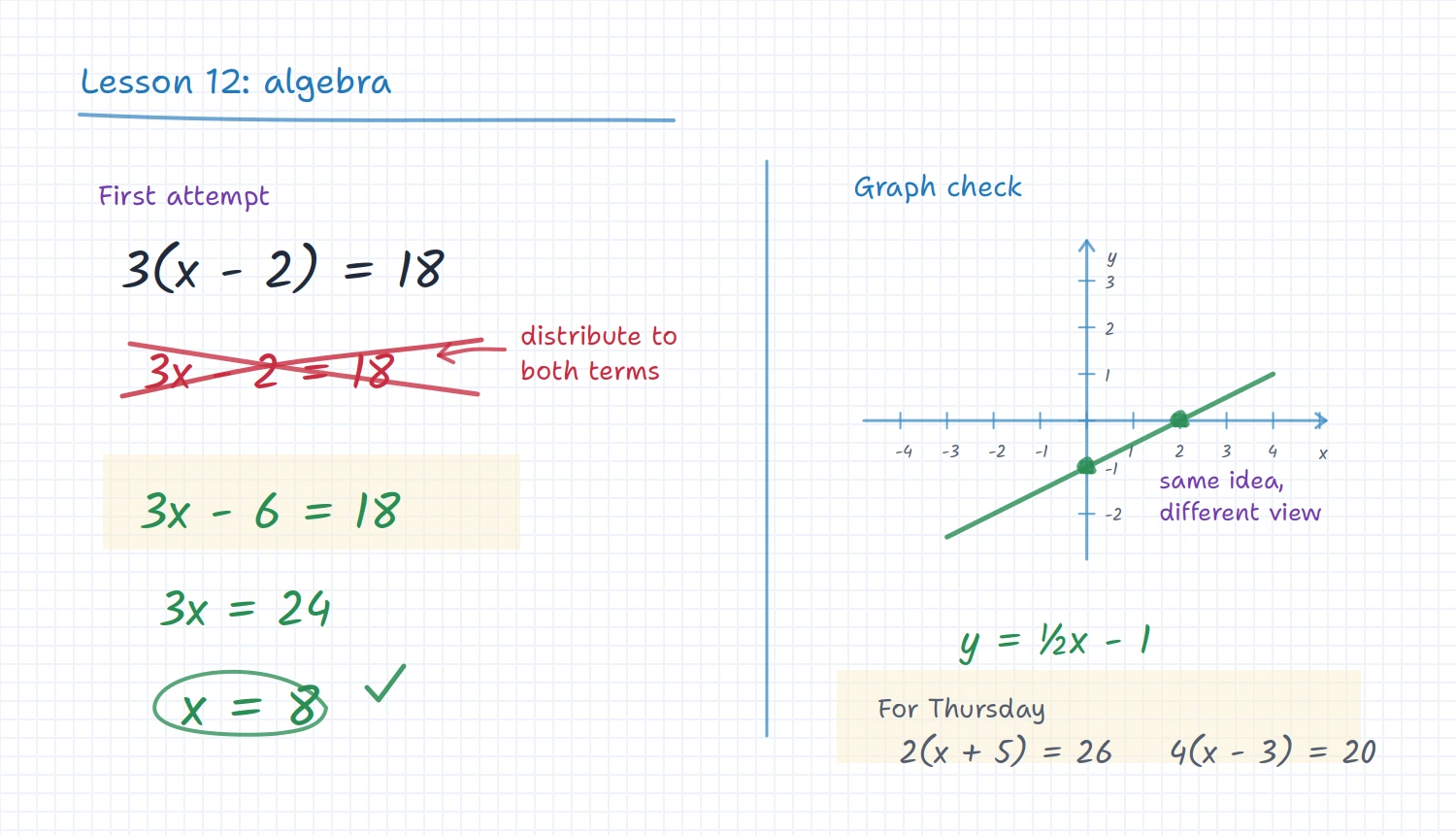
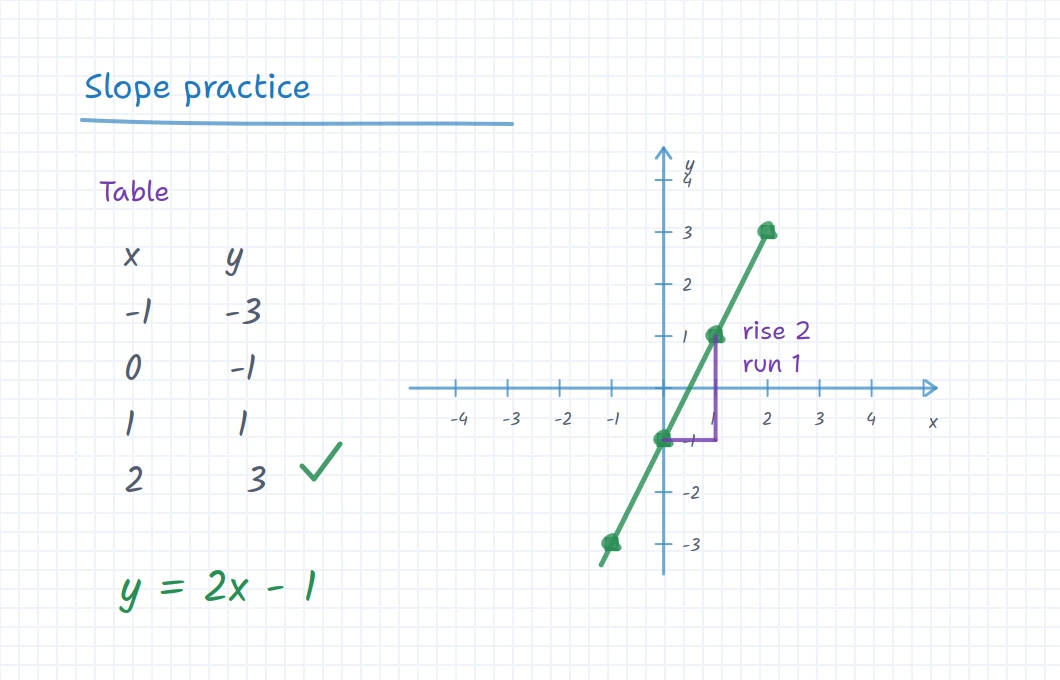
Students often understand a rule better when they can see it in more than one form. A tutor can build the equation, fill a table, plot the points, and talk through slope or intercepts on the same board.
That makes iDroo a better fit for math tutoring than a plain sketch pad. The board has room for notation and visual checks side by side, so the student can connect the procedure with the picture.
Build tables of values next to the equation instead of switching tools.
Sketch axes, plot points, and mark slope or intercepts while explaining.
Keep formulas, corrections, and short notes visible beside the graph.
Homework review
Use the board to review the mistake, not just the answer
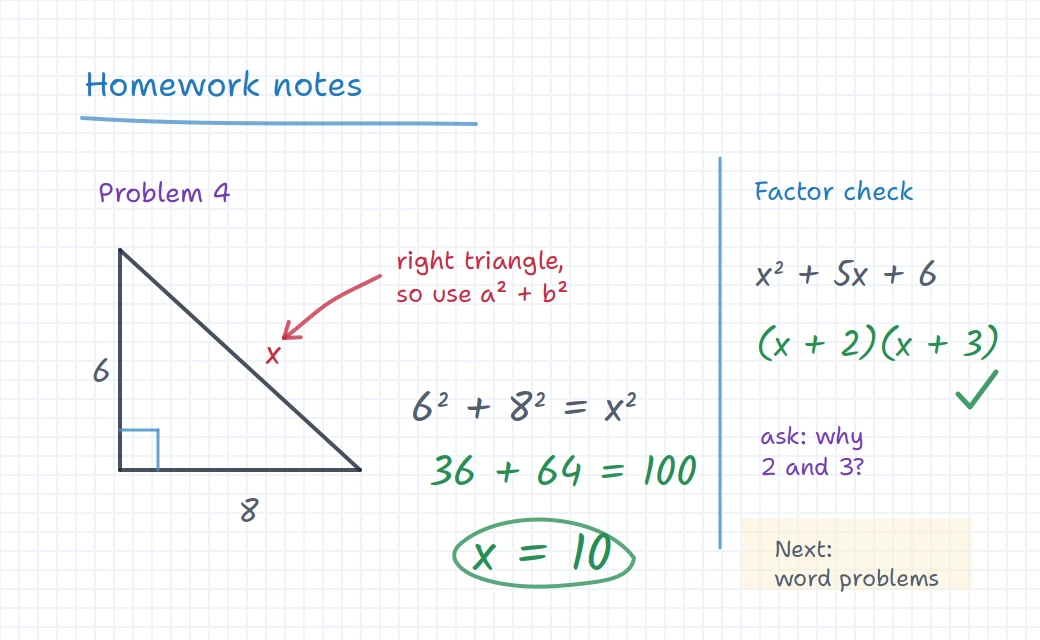
Homework review is where many online tutoring tools become awkward. The student needs to show what they tried, the tutor needs to mark the exact step that went wrong, and both need space to try a similar problem.
With iDroo, a tutor can upload or recreate the problem, annotate the work, and keep the corrected example available. That is especially helpful for geometry diagrams, factoring, word problems, and multi-step algebra where a small error changes everything.
Where it fits
A math board for the kinds of tutoring that need working space
Use iDroo for short homework help, recurring private lessons, or a more structured tutoring program with assignments and saved boards.
Algebra steps
Show each transformation, mark the first wrong move, and leave a similar problem for practice.
Geometry diagrams
Draw triangles, angles, labels, and short explanations while the student follows the reasoning.
Homework review
Work through uploaded exercises or recreated problems without losing the student’s attempt.
Between-session practice
Keep lesson boards available and add assignments when the student needs a clear next task.
Before you try it
Questions math tutors usually ask
How is this different from a generic online whiteboard?
A generic board may be enough for quick drawing. iDroo is built for teaching work that can continue: boards can include math notation, images, documents, graphing-style sketches, assignments, and saved lesson material.
Can students write on the board too?
Yes. A tutor can give the student room to attempt a step, label a diagram, or mark a worksheet so the lesson is not only a demonstration.
Can I use worksheets or homework screenshots?
Yes. You can bring visual material onto the board and work over it with notes, corrections, and follow-up examples.
Can I keep boards for recurring students?
Yes. Saved boards and course materials help a tutor return to the examples, corrections, and practice work from earlier sessions.
Try iDroo with your next math tutoring session
Start with one shared board for a real student problem. Add assignments or courses later if your tutoring workflow needs more structure.
Create your free account